


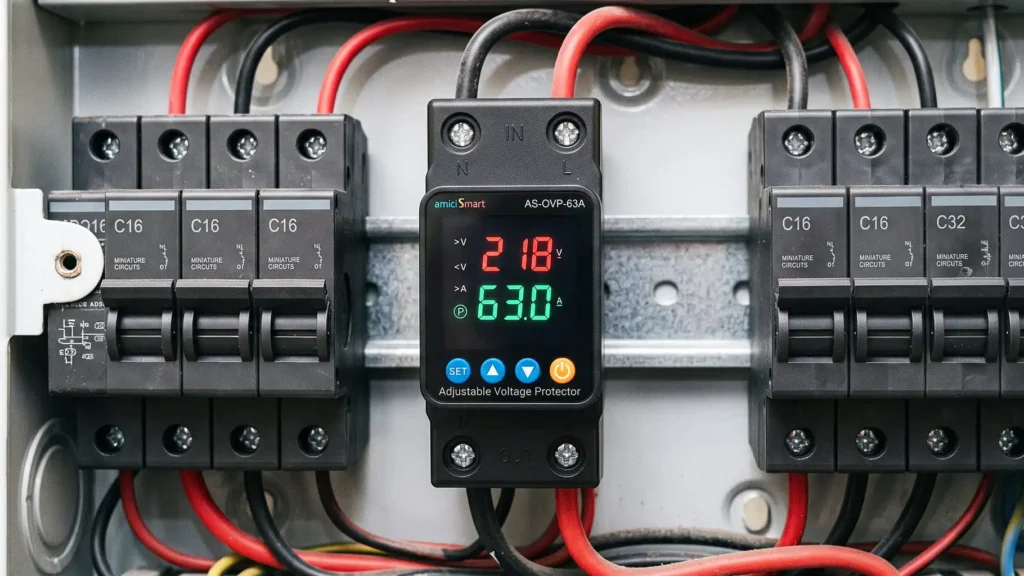
Power fluctuations are an inevitable threat, especially in regions with unstable electrical grids. A sudden voltage spike or an unexpected drop can instantly destroy expensive household appliances, sensitive networking equipment, and server hardware.
While standard MCBs (Miniature Circuit Breakers) protect against short circuits, they do not monitor voltage health. This is where the amiciSmart 63A Automatic Over/Under Voltage Protector steps in. Installed directly into your main distribution board, this smart, DIN-rail-mounted relay actively monitors your incoming power and disconnects your circuit the millisecond unsafe voltages are detected.
In this review, we will evaluate the amiciSmart 63A model’s capabilities, its ideal use cases for modern residential setups, and exactly how to configure it.
Table of Contents
⚡ Core Features of the amiciSmart 63A Voltage Protector
The amiciSmart acts as a highly customizable 3-in-1 electrical sentry. It continuously analyzes the line and offers the following primary safeguards:
- Over/Under Voltage Protection: Instantly cuts the power if the grid voltage surges above your set maximum (e.g., 270V) or drops below your set minimum (e.g., 170V).
- Over-Current Protection: Acts as a digital, highly accurate overload switch. If the current draw exceeds your configured limit (up to 63A), it trips the circuit to prevent wire melting or electrical fires.
- Intelligent Auto-Reconnect: You do not need to manually reset the device in the dark. Once the grid stabilizes and the voltage returns to safe levels, the unit waits for a pre-configured recovery delay (e.g., 30 seconds) and automatically restores power.
- Real-Time Dual LED Display: Features crisp digital readouts on the front panel, allowing you to instantly check the live incoming voltage (V) and the current load (A) without using an external multimeter.
🏢 Ideal for Multi-Flat Residential Buildings & Homelabs
What makes the amiciSmart highly practical is its form factor. Because it snaps directly onto a standard 35mm DIN-rail, it fits perfectly inside any modern consumer unit alongside standard breakers.
This makes it an exceptional choice for multi-story residential buildings. By installing one of these protectors next to the dedicated electrical sub-meter for each individual rental flat, you can completely isolate and protect specific floors from localized surges. If one flat draws too much current, the amiciSmart trips for that unit alone, leaving the rest of the building’s power uninterrupted.
Additionally, if you run high-frequency web servers, MikroTik routing equipment, or UniFi access points, placing this protector upstream ensures your sensitive network lab is never subjected to hardware-frying voltage spikes.
🛠️ Technical Specifications & Adjustable Settings
Unlike basic analog protectors, the amiciSmart allows you to finely tune the parameters to match your specific wire gauge and load requirements.
| Protection Setting | Adjustable Range | Recommended Setting for 230V Grid |
| Over-voltage Protection (OV) | 230V to 300V | 260V |
| Under-voltage Protection (UV) | 140V to 210V | 180V |
| Over-current Protection (OC) | 0.5A to 63A | Match to your main incoming wire capacity (e.g., 30A, 40A or 63A) |
| Protection Action Time | 0.1 to 30 seconds | 0.5 – 1 second |
| Recovery Delay (Auto-Reconnect) | 1 to 500 seconds | 180 seconds (Allows compressor-based appliances like fridges to safely reset) |
AmiciSmart AS-OVP-63A Master Reference & Comprehensive Parameter Manual
This manual provides an in-depth explanation of every single function, parameter code, and setting on the amiciSmart 63A Voltage Protector. It is designed to bridge the gap left by the manufacturer’s abbreviated instruction sheet.
How to Navigate and Program
The Buttons:
- SET Menu: Press SET to enter programming. Short-press to jump to the next parameter.
- Up: Increase value.
- Down: Decrease value.
- Power: Short-press turns device OFF/ON. Long-press (while OFF) triggers Factory Reset.
Programming Steps: Press SET until “P 1” appears. Use arrows to change the value. Tap SET to move to “P 2”. When finished, wait 15 seconds without pressing anything to automatically save and exit.
Power & Delay Settings
- P1: Power-On Time Delay (Range: 1-999s) Determines how long the device waits before turning on the power to your house after a total grid blackout (cold boot). This wait time allows high-pressure refrigerant in appliances to equalize before the motors attempt to start.
- Recommended: 180 (3 Minutes).
- P2: Fault Recovery Delay (Range: 1-999s) The wait time before restoring power after an over/under voltage fault or over-current trip clears. This should match P1 so appliances are protected identically regardless of how power is interrupted.
- Recommended: 180 (3 Minutes).
Voltage Protection Limits
- P3: Over-Voltage Trip Threshold (Range: 130V-300V) The absolute maximum safe voltage. If grid voltage rises above this number, the device immediately cuts power to prevent your electronics from frying.
- Recommended: 260V to 270V.
- P4: Over-Voltage Recovery (Range: 125V-295V) After an over-voltage trip (P3), the grid voltage must drop back down below this value before the device considers the grid “safe” and begins the P2 countdown timer. (Must be lower than P3).
- Recommended: 255V to 265V.
- P5: Under-Voltage Trip Threshold (Range: 80V-210V) The minimum safe operating voltage. Motors running on very low voltage draw excessive current and burn out. If voltage drops below this, power is cut.
- Recommended: 170V to 180V.
- P6: Under-Voltage Recovery (Range: 85V-215V) After an under-voltage trip (P5), the grid must climb back up to this value before it is considered stable enough to start the P2 recovery timer. (Must be higher than P5).
- Recommended: 175V to 185V.
- P7: Voltage Trip Time (Reaction Speed) (Range: 0.1s-10s) Determines how long a voltage spike or drop must last before the device trips. A setting of 0.5s prevents the device from tripping during harmless micro-fluctuations, avoiding nuisance blackouts.
- Recommended: 0.5.
Current (Amperage) Protection
- P9: Over-Current Trip Threshold (Range: 1A-63A) The maximum electrical load (amperage) allowed through the device. If you run too many heavy appliances at once and exceed this limit, it trips to prevent wire fires.
- Recommended: 63.0 (Or match your main incoming utility breaker).
- P10: Current Trip Time (Range: 0.1s-10s) Similar to P7, this is the reaction speed for an over-current event. Heavy motors (like ACs) draw a massive surge of current for a fraction of a second when they start. A delay prevents these normal surges from tripping the device.
- Recommended: 3s to 5s.
- P11: Current Fault Counter (Range: 0-20 times (or oFF)) If the device trips due to excessive current (overload), it will try to reconnect power automatically. This parameter limits how many times it will retry. If set to “oFF”, it will retry infinitely. If set to a number (e.g., 5), it will lock out permanently after 5 failed attempts, requiring manual intervention.
- Recommended: oFF (or 5 for stricter safety).
Calibration Settings (P8, P12, P13)
These settings are used by installers to calibrate the device if its internal sensors do not match a professional multimeter. Do not adjust these unless necessary.
- P8: Voltage Calibration (Range: -10% to +10%) Adjusts the on-screen voltage reading up or down if the device is reading inaccurately.
- P12: Current Calibration (Range: -10% to +10%) Adjusts the on-screen amperage reading up or down.
- P13: Frequency Calibration Calibrates the AC frequency reading (50/60Hz). WARNING: Manufacturer instructs DO NOT MODIFY.
Advanced System Logic (P14 – P19)
- P14: Fast Power-Down Protection (Range: on/oFF) When ON, the device attempts to detect intentional manual switching or harmless micro-flickers, bypassing the P1/P2 delays to reconnect power instantly. When OFF, the strict delay timers are enforced every single time power drops.
- Recommended: oFF (Forces your 3-minute delay unconditionally).
- P15: Display Mode (Range: 1/2/3) Controls what the screen shows. 1 = Standard (shows V and A continuously). 2 = Manual view switching. 3 = Automatic cycling of readouts.
- Recommended: 1.
- P16: Automatic Reset (CRITICAL) (Range: on/oFF) The master toggle for automatic timer recovery. If this is turned OFF, the device will stop tracking recovery delays entirely and may bypass protection logic.
- Required: Must be ‘on’ for delays to function.
- P17: Protective Action Toggle (Range: on / oFF) Disables the actual relay cutoff mechanism. If OFF, the device acts purely as a meter and will NOT cut power during dangerous voltage spikes.
- Required: Must be ‘on’ to protect your appliances.
- P18: Energy Conserving Mode (Range: on/ oFF) Dims the LED screen after a period of inactivity.
- Recommended: User Preference (Usually oFF so you can read it easily).
- P19: System Lock Code (Range: 000-999) Allows you to set a 3-digit passcode to prevent unauthorized tampering with your safety limits.
Troubleshooting & Factory Reset
If the device enters a lockout state, misbehaves, or you forget the P19 lock code, you can wipe the memory:
- Ensure the grid power to the device is physically ON.
- Press the orange Power button once quickly to put the device in its internal OFF state.
- Press and hold the orange Power button for 5 to 10 seconds.
- The screen will flash or reset, indicating memory has been wiped.
- You must now re-enter the menu and reprogram all settings (P1 through P9), as they will revert to factory defaults.
📺 Step-by-Step Setup & Configuration Video
Programming the digital limits using the “SET” button on the front panel can be slightly confusing for first-time users. To see exactly how to wire the input/output terminals and navigate the digital menu to set your voltage limits, watch this complete setup tutorial:
⚖️ Pros and Cons
Pros:
- Highly customizable over/under voltage and current thresholds.
- The automatic reconnect feature eliminates the hassle of manual resets after grid fluctuations.
- The live LED display provides instant diagnostic data on grid health.
- Takes up minimal space (usually 2 standard MCB slots) in the distribution board.
Cons:
- Requires installation by a qualified electrician, as it handles live, high-amperage mains power.
- It is not a Surge Protection Device (SPD). It will not protect against the massive, microsecond voltage spikes caused by direct lightning strikes.
FAQ
Can I install the amiciSmart Voltage Protector myself?
No. Because this device intercepts the main incoming power supply, installation, wiring, and configuration must be carried out by a licensed electrician while the main breaker is completely isolated.
Does this replace my MCB or RCCB?
No. The amiciSmart works alongside your existing safety devices. An MCB protects against short circuits, an RCCB protects against earth leakage (electric shocks), and this device protects against voltage instability.
What is the maximum current rating for this device?
This specific model is rated for a continuous maximum load of 63 Amps. However, you must configure the over-current setting (OC) to match the safe carrying capacity of the electrical wires installed in your home.
What happens when the voltage returns to normal after a surge?
The device features an automatic reconnect function. Once the monitored supply falls back within your configured safe limits, the protector waits for the selected recovery delay (default 30 seconds) and then automatically restores power to your home or equipment.
Does this device protect against lightning strikes?
No. The amiciSmart Voltage Protector is designed to guard against grid-level over-voltage, under-voltage, and over-current fluctuations. For direct lightning protection, you must install a dedicated Surge Protection Device (SPD) alongside this unit.
