


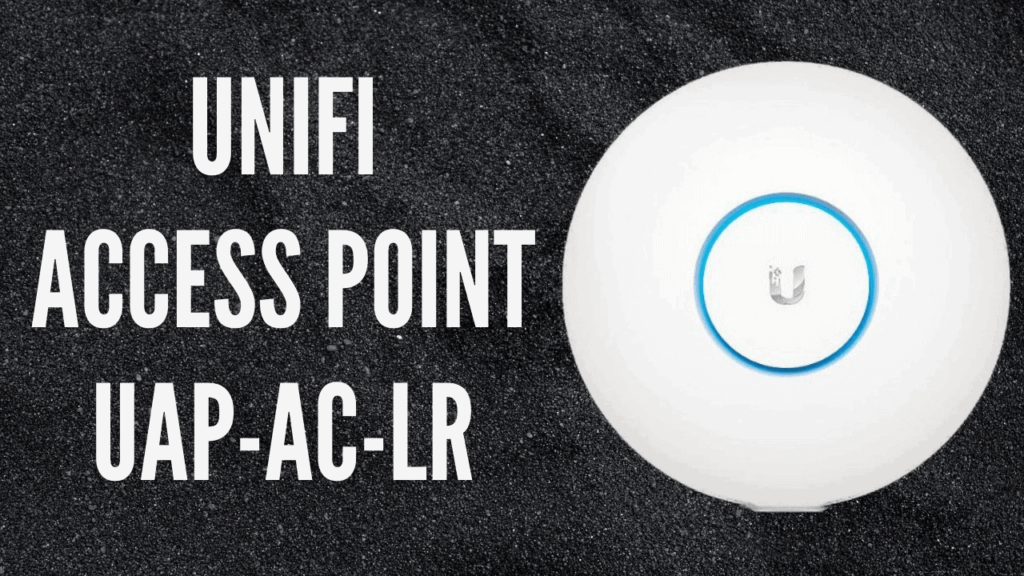
Today we’re going to take a look at the Ubiquiti UniFi AP AC LR access point, part of the Ubiquiti Unifi range. The UniFi AC LR comes complete with the AP LR itself, mounting equipment, POE injector, and quick start guide. you can opt to have either the UK or EU power supply when you order. or we could be powered over ethernet.
Table of Contents
Unifi AP AC LR
The UAP AC LR is lightweight makes it easy to install the unit is stylish meaning it will not look unattractive once it has been deployed the mounting equipment is easy to use and the amount can be clipped into place the AP AC LR has features that include 802 11 AC technology simultaneous dual-band 450 Mbps at 2.4 gigahertz an 867Mbps at 5GHz a range of one hundred and eighty-three meters or 600-foot is both wall and ceiling mountable wireless uplink and has 24 volts passive PoE support.
The UAPAC-LR has three by three MIMO at 2.4 gigahertz and two-by-two MIMO at 5GHz and is available as both a single unit and in five packs. The innovative antenna design allows for long-range coverage over symmetrical link coverage areas. The UAP AC LR offers 802 11 AC Wi-Fi performance which is up to five times faster than that of 802 11 n it also ensures that the model is future-proofed.
UniFi comes with a huge variety of benefits as a Wi-Fi system offers unlimited scalability Enterprise Performance all managed through a unified controller system you can start with one access point expand to thousands still using the same management system the unified controller system is packed with features and makes management of your unified network simple through any web browser with the controller you can provision thousands of ap’s map out networks and manage system traffic this can be done for multiple sites from one central system.
The control system offers advanced RF performance configuration features and RF map and one is uplink functionality it also enables guess portals and hot spots to be set up the Unifi AC models can be rapidly deployed using the android and iOS mobile application no controller is required after reviewing the Ubiquiti UniFi AC LR we’ve given it an IcyFlame Studio rating of nine out of ten.
The UAP-AC-LR is a long-range access point with dual-band and speeds of up to 867 megabits per second. The UniFi AC LR is a highly scalable and cost-effective indoor enterprise access point solution it is also worth noting that although the Unifi AC LR runs an excellent 867 megabits per second other models in the ubiquity range of speeds of up to 1,300 megabits per second in the 5 gigahertz band.
FAQ
What is the maximum speed and coverage range of the UniFi AP AC LR?
The Ubiquiti UniFi AP AC LR delivers an aggregate dual-band throughput of up to 1317 Mbps and provides a massive long-range wireless footprint of up to 183 meters (600 feet). By utilizing 802.11ac Wave 1 technology, it serves as an ideal indoor access point for large enterprises or sprawling homes that require consistent, high-speed Wi-Fi across long distances.
How many devices or concurrent users can the UniFi UAP-AC-LR support?
The UniFi AP AC LR is engineered for high-density networking environments and can reliably support 250+ concurrent clients on a single access point. Because of its advanced RF management and simultaneous dual-band capabilities, it maintains a stable, enterprise-level connection without dropping speed—even when dozens of devices are streaming simultaneously.
Do I need a dedicated hardware controller to set up the UniFi AP AC LR?
No, you do not need a dedicated hardware controller to perform a basic setup on the UniFi AP AC LR. While the free, centralized UniFi Network Controller software offers unlimited scalability and advanced network mapping, you can rapidly deploy and manage standalone access points in just a few minutes using the UniFi mobile app for iOS and Android.
Does the UAP-AC-LR include a PoE injector in the box?
Yes, if you purchase the standard single-pack version of the UniFi AP AC LR, it comes complete with a Gigabit PoE (Power over Ethernet) adapter and all the necessary wall and ceiling mounting hardware. However, if you purchase the bulk 5-pack bundle, PoE injectors are intentionally excluded because those units are designed to be powered directly by a UniFi PoE Switch.
What are the MIMO specifications for the UniFi AC Long Range access point?
The UniFi AC LR features an innovative, symmetrical antenna design that utilizes 3×3 MIMO technology on the 2.4 GHz band (pushing up to 450 Mbps) and 2×2 MIMO on the 5 GHz band (pushing up to 867 Mbps). This specific configuration allows the access point to broadcast a stronger signal to distant smartphones and effortlessly pull in weaker return signals.
UniFi AP AC LR
A Long-range, dual-band, 802.11ac Wave 1 access point that can support concurrent users up to 250.
-
Features
-
Performance
-
Wireless



2 Comments
Can you tell me how to setup secondary router in vianet router please
To setup secondary router, You will just need to connect Ethernet/Lan Cable from primary router to secondary router.
Feel free to text us on Social Media for Tech Support.