



The Mikrotik RB5009 Series is one of the most powerful home lab routers which was inspired by the feedback from Mikrotik User Meetings (MUM).
Related: UniFi POE Switch (US-16-150W)
Table of Contents
Mikrotik RB5009UG+S+IN
The RB5009UG+S+IN features a total of 9 ports which are connected to the Marvel 88E6393 Switch chip.
This switch chip has a 10 Gigabit full duplex line to Marvell 88F7040 Quad-Core ARMv8 CPU that runs at 1.4Ghz. Both CPU & Switch chips are located at the bottom of the board so that the metallic case can be used as a massive heat sync.
The Mikrotik 5009 comes with 1GB DDR4 ram & 1GB of NAND storage.
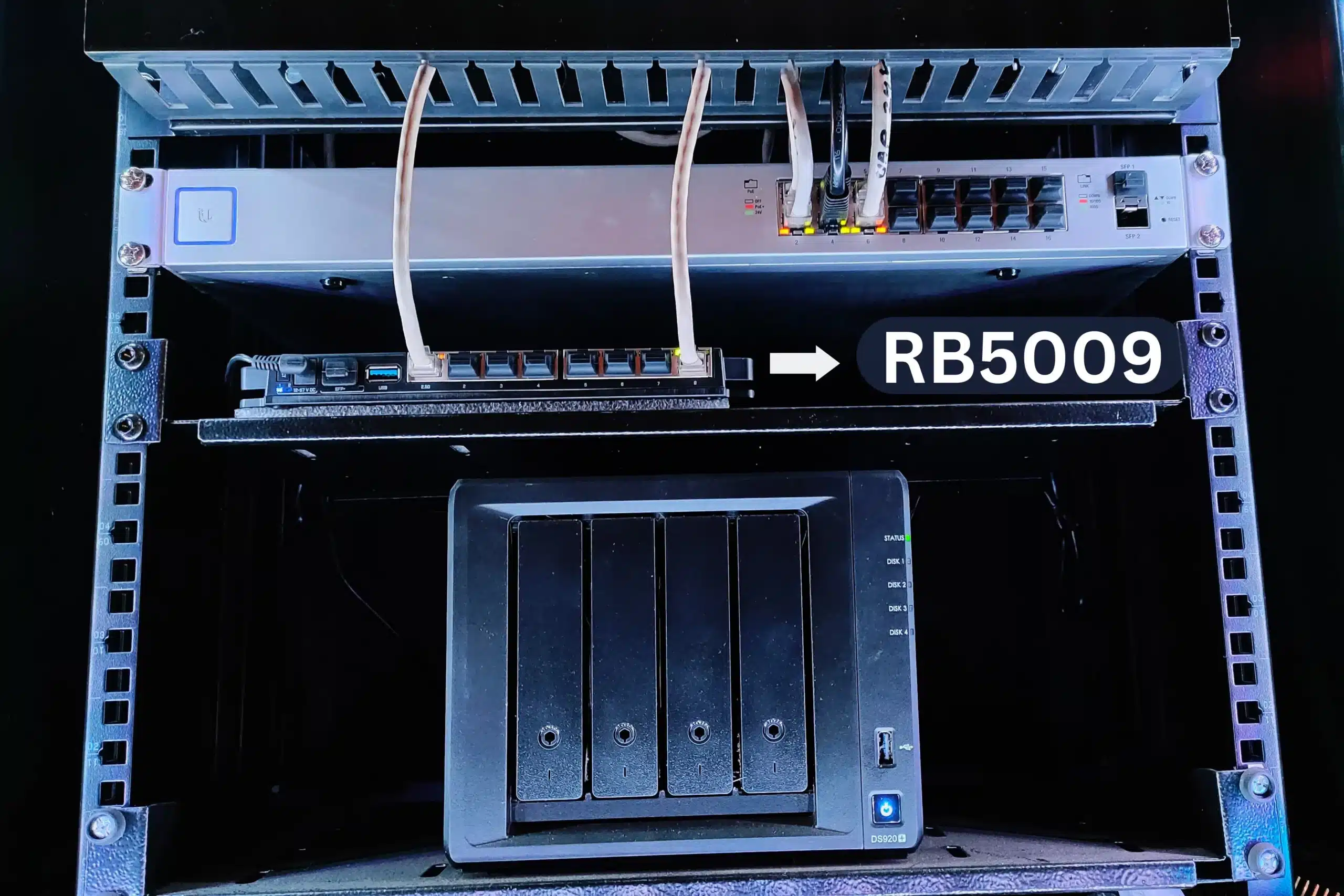
RB5009 Features
- 7x Gigabit Ethernet Ports
- 1x 2.5G Ethernet Port
- 10G SFP+ Port
- Durable Metallic Case
- More Powerful Quad-Core CPU
- 1GB DDR4 Ram
- 1GB NAND Storage
- RouterOS v7 only
- Cpu temperature monitor
- Passive Cooling
- Full sized USB-A
- Can fit Up to 4 devices in 1U
- Redundant power supply
Redundant Power Options
The Mikrotik Routerboard RB5009UG+S+IN can be powered in 3 different ways:
- 802.3af/at PoE-in from Ethernet port 1
- DC Jack
- A 2-pin terminal on the side
Specifications
| Product code | RB5009UG+S+IN |
| CPU | 88F7040 1.4 GHz |
| CPU architecture | ARM 64bit |
| CPU core count | 4 |
| Size of RAM | 1 GB |
| RAM type | DDR4 |
| Storage | 1 GB, NAND |
| Number of 1G Ethernet ports | 7 |
| Number of 2.5G Ethernet ports | 1 |
| Number of 10G SFP+ ports | 1 |
| USB port | 1 ( USB 3.0 type A) |
| Operating system | RouterOS v7 only |
| Switch chip model | 88E6393 |
| Dimensions | 220 x 125 x 22 mm |
| Operating temperature | -40°C to +60°C |
Related: Raisecom ISCOM HT-803-N
Performance
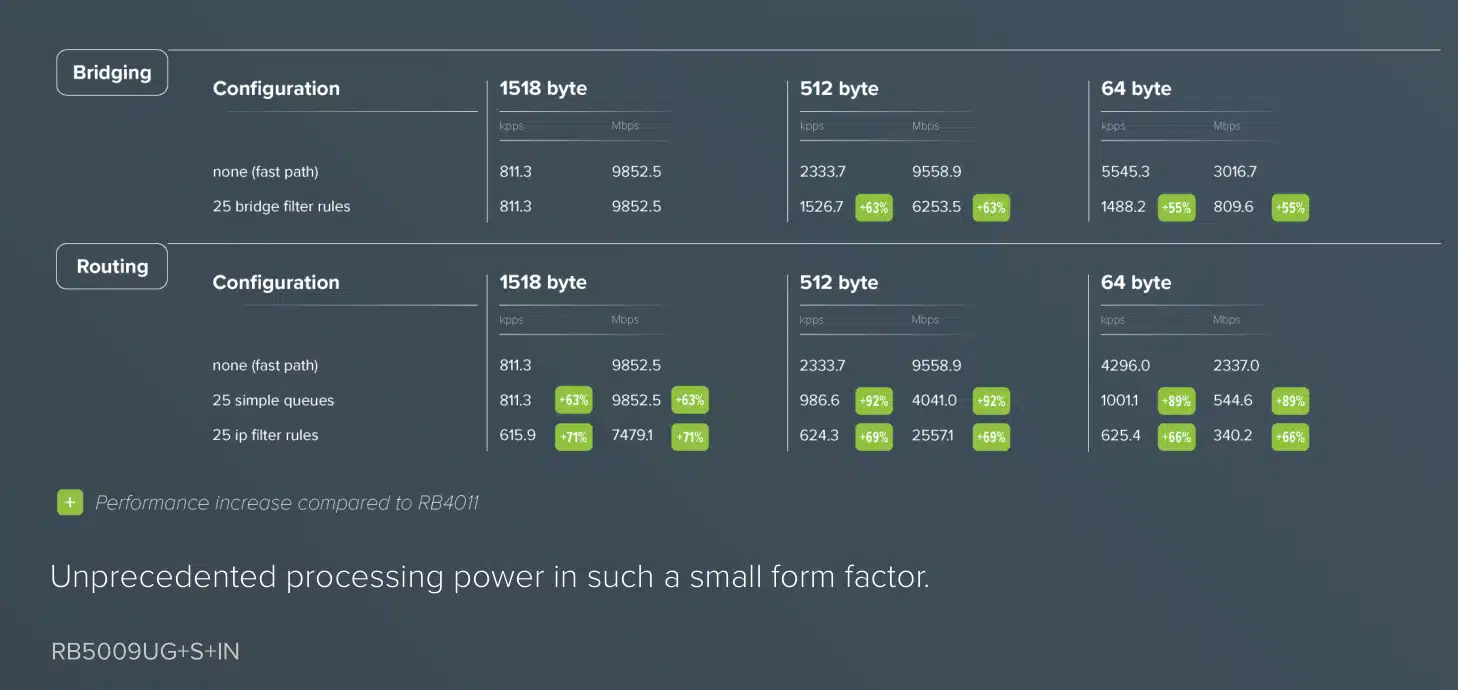
Mikrotik RB5009UG+S+IN Review
The Mikrotik RB5009 is a perfect home lab router that can handle heavy CPU loads. Mikrotik has really taken these router boards to the next level in performance, beating several other brands in the price range.
The Mikrotik Router Board is powered by Router OS which is a very powerful system that provides you with all the facilities like an Internet Service Provider.

The Router is powered by a Quad Core Processor and has 1 GB of RAM with 1 GB of Storage.
SFP+ Compatibility
- S-RJ01 – RJ45 SFP 10/100/1000M copper module
- S-85DLC05D – SFP (1.25G) module, 550m, Multi Mode
- S-31DLC20D – SFP (1.25G) module, 20KM, Single Mode
- S-3553LC20D – Two SFP (1.25G) module kits, 20Km, single mode
- S-55DLC80D – SFP 1.25G module for 80km links with Dual LC-connector
- S-4554LC80D – Pair of SFP 1.25G modules for 80km links with Single LC connectors
- SFP CWDM
- SFP 1m/3m DAC – SFP+ direct attach cable
- S+AO0005 – SFP+ Active Optics direct attach cable, 5m
- SFP28 1m/3m DAC – Direct attach cable that supports not only SFP 1G and SFP+ 10G but also the 25G SFP28 standard
Perfect Home Lab Router
FAQ
Does Mikrotik RB5009 have WiFi?
The Mikrotik Routerboard RB5009 is an ethernet router and it does not have any wireless radio built into it. Hence it cannot broadcast any WiFi.
What is the default IP address, username, and password for the MikroTik RB5009?
Out of the box, the RB5009 can be accessed via the default IP address 192.168.88.1. The default username is admin, and the password field should be left blank. It is highly recommended to set a strong password immediately upon your first login.
How do I factory reset the RB5009?
To perform a hardware reset, unplug the device, press and hold the reset button, and then plug the power back in. Keep holding the button for about 10 seconds until the user LED starts flashing rapidly, then release it to clear the configuration.
Can I use 1G SFP modules in the RB5009’s SFP+ cage?
No. The SFP+ cage on the RB5009 requires 10G SFP+ modules or compatible 10GBASE-T transceivers. Standard 1G SFP modules are not officially supported and will likely fail to negotiate a link.
Does the 2.5G port support NBASE-T multi-gig standards?
The 2.5G port implements the 2.5GBASE-T standard (IEEE 802.3bz). It does not support 5GBASE-T. For the best interoperability, ensure you are connecting it to a matching 2.5G switch or a standard Gigabit interface.
Can I rackmount the MikroTik RB5009?
Yes. Despite its compact footprint, you can mount up to four RB5009 units side-by-side in a single 1U rackmount space using the optional MikroTik K-79 rackmount kit.
What is the difference between the RB5009UG+S+IN and the RB5009UPr+S+IN?
The key difference is Power over Ethernet (PoE) delivery. The standard UG+S+IN model only accepts PoE-in. The UPr+S+IN model supports both PoE-in and PoE-out on all eight of its Ethernet ports, providing up to 130W of total power budget to run downstream devices like access points and IP cameras.
What power supply options are available for the RB5009?
The indoor models provide excellent redundancy by supporting three different powering methods: standard DC jack, a 2-pin terminal block, and PoE-in (802.3af/at). The router will automatically draw power from the source with the highest voltage.
Can I flash OpenWrt or pfSense on the RB5009?
No. The RB5009 series utilizes an ARM64 processor with a proprietary bootloader and enforced secure boot. It is locked to MikroTik’s RouterOS v7. Operating systems like OpenWrt or pfSense are not supported and cannot be installed.
Does the RB5009 support RouterOS v6?
No, the RB5009 architecture was built exclusively for RouterOS v7. You cannot downgrade the device to v6.
Is the RB5009 powerful enough for 10Gbps routing?
While the router features a 10G SFP+ port, it is designed for environments bridging Gigabit and multi-Gigabit networks. The quad-core 1.4 GHz ARM CPU can easily sustain line-rate forwarding with hardware offloading enabled. However, deep packet inspection, complex QoS queues, or heavy IPsec VPN encryption will heavily utilize the CPU, meaning you will not hit 10Gbps across complex routing tables.
Mikrotik RB5009UG+S+IN Router
Powered by a Quad Core CPU, 1GB RAM, 1GB NAND Storage, Eight Gigabit Ethernet Ports including a 2.5G Ethernet Port, 10G SFP+, a USB 3.0 Port, and a reliable Redundant Power Supply, the Mikrotik RB5009 is the a robust home lab router.
-
Features
-
Performance
-
Ports
-
Power Options




1 Comment
This looks like a very nice Router. The one thing that puts me off is the lack of a 2nd 10G SFP+ port. With that, you could carry your 10G WAN to your 10G CRS326 for example. But of course, you’d have to be able to route that fast. Maybe an upcoming product with more horsepower?